Bettina Bot: Automated General Reports Collection Service
At ACS, we collect personal reports from all employees monthly.
Previously managed manually by our chief engineer, this process is now automated through Bettina Bot.
As of April 2025, the service also includes enhanced features and guidance for project and team reporting.
Reporting Schedule
| Date |
Action |
Deadline |
| 25th of the month |
Initial request for personal reports emailed to employees. |
1st EOB |
| 1st of next month |
First reminder for overdue reports. |
2nd EOB |
| 3rd of next month |
Final reminder for overdue reports. |
3rd EOB |
| 4th of next month |
Full personal reports submitted to acs-leitung
Team reports to teamleaders
Project reports extractions from personal reports in project repo. |
project reports: 7th EOB |
| 8th of next month |
Project reports forwarded to teamleaders for aggregation in team reports. |
team reports: 13th EOB |
Personal Reporting
How Reports Are Collected
You’ll receive an email with a personalized link to upload your report. This link:
- Is exclusive to you.
- Refers to the specific month stated in the email.
- Remains valid for future edits.
If you miss the deadline, two automated reminders (with the same link) will follow.
Note: Save the email for later reference—it contains your report history and edit link.
Confidentiality
- Reports are stored centrally, accessible only by department heads.
- Your teamleader receives a copy of your full report.
- Project-related contributions are shared with project-leads (as specified in the "Project Contribution" section).
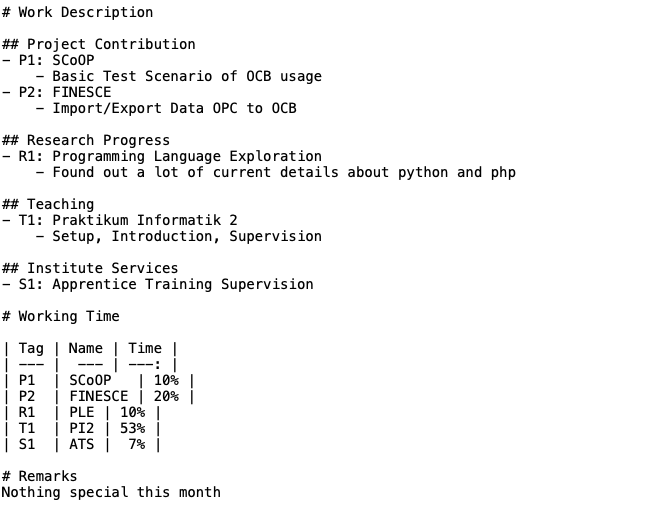
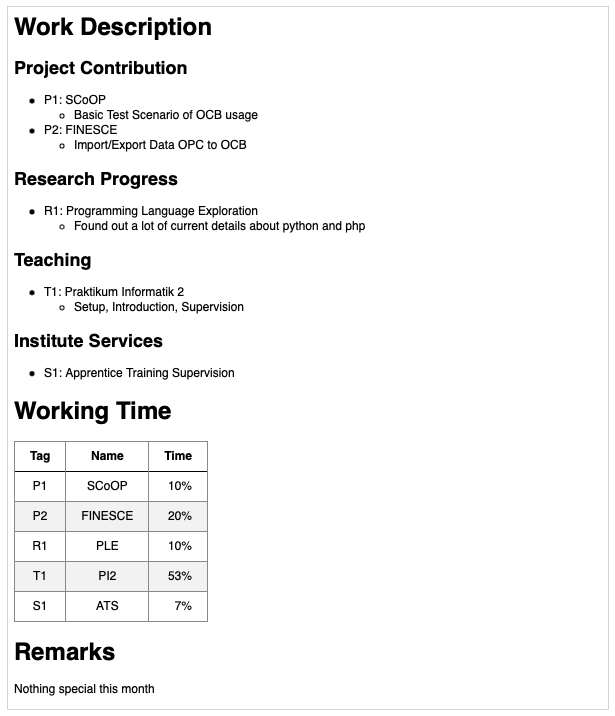
Submit your report as a Markdown (*.md) text file. This simple format supports:
- Headers
- Lists
- Tables
Before uploading (plain text):
After uploading (rendered Markdown):
Required Sections
-
Work Description
- Breakdown of activities into four subsections:
- Project Contribution: List projects (tagged
P1, P2, etc.) with brief descriptions.
- Research Progress: List topics (tagged
R1, R2, etc.).
- Teaching: List courses (tagged
T1, T2, etc.).
- Institute Services: Other contributions (tagged
S1, S2, etc.).
-
Working Time
- A table linking your tagged activities to time allocation (in percentages). Example:
        | Tag | Name          | % Time |
        |-----|---------------|--------|
        | P1  | Project Alpha | 40%    |
-
Remarks
- Optional notes (e.g., absences, contextual details).
Template & Advanced Uploads
- First-time users: A pre-filled template is available in the upload portal.
- Subsequent uploads: Reuse your previous report as a starting point (linked in the upload portal).
- Holiday/leave period? Upload reports early using the link from the prior month’s email.
Streamlining Personal and Project Reports
To support automated data extraction and reduce redundant reporting:
-
Structure Compliance: Follow the sections above.
-
Project Contribution:
- List projects at the top level (e.g.,
P1: Project Alpha).
- Avoid nested details here—add them to subtasks if needed.
-
Working Time Table:
- Only include a table with
Tag, Name, and % Time columns.
Tag must match project tags (e.g., P1).Name must match the exact project name in Project Contribution.
-
Post-Submission Feedback:
- After submitting, review the notifications below your report to confirm automated project reporting.
- If data is missing, edit and re-upload until all projects are recognized.
Project Reporting Automation
How It Works
The system:
- Scans
Project Contribution sections of all personal reports.
- Identifies projects listed in GitLab’s Project Reporting repositories.
- Aggregates contributions per project and emails project leads to finalize reports.
Troubleshooting
- Why didn’t I receive a request?
Ensure your project’s repository contains a
reporter.txt file with your email on the first line.
- Can I stop requests for an ended project?
Yes — you can delete the
reporter.txt file immediately.
- What if no activity occurs for 90 days?
Requests will halt automatically.
Links:
- Markdown Cheatsheet
|
 E.ON ERC - ACS - Bettina Bot - General Reporting Service