E.ON ERC - ACS - Bettina Bot - General Reporting Service
Bettina Bot the general reports collection serviceAt ACS, we collect personal reports from each employee every month. While this this was once done by our chief engeneer manually, we have switched to an automated collection of reports. This is done by Bettina Bot. As of April 2025 the service also includes some addidtional features and guidance regarding the project and team reporting.
What is the schedule of the report collection?
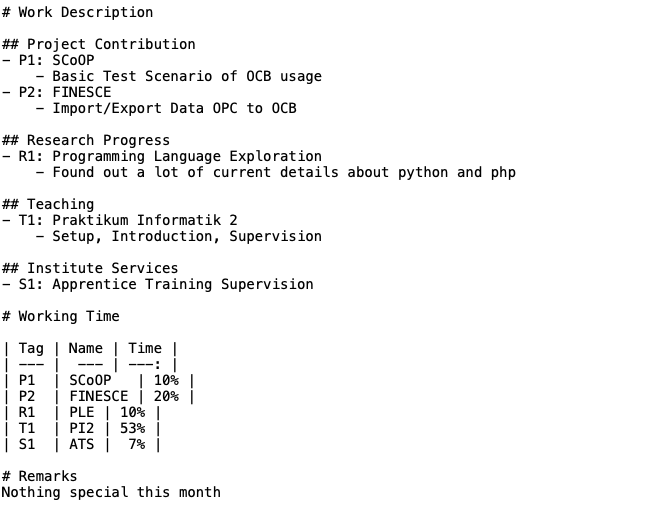
Personal ReportingHow is my personal report collected?You will get an email with a request to upload your report. The email will contain a personalized link directly to the upload page. The link will only be valid for you and permanently refers to the month that is explicitly stated in the email. You can and should keep the email with the personalized link in order to view your uploaded report or to edit the content of the report later. If you do not upload your report in time, there will be two additional recall emails with the same link. Who can see my personal report?All reports are collected at a central space that can only be accessd by the heads of department. Additionally your teamleader gets a carbon copy of your report. Project contribution is also reported to the project lead. Parts of the personal reporting - regarding project contribution - is forwarded to the project-leads. How should my personal report look like?You hand in your report technically in the form of a simple text file. The file is written in markdown - a very easy to use form of structuring information in a simple text file. While editing you see the file more like plain text:
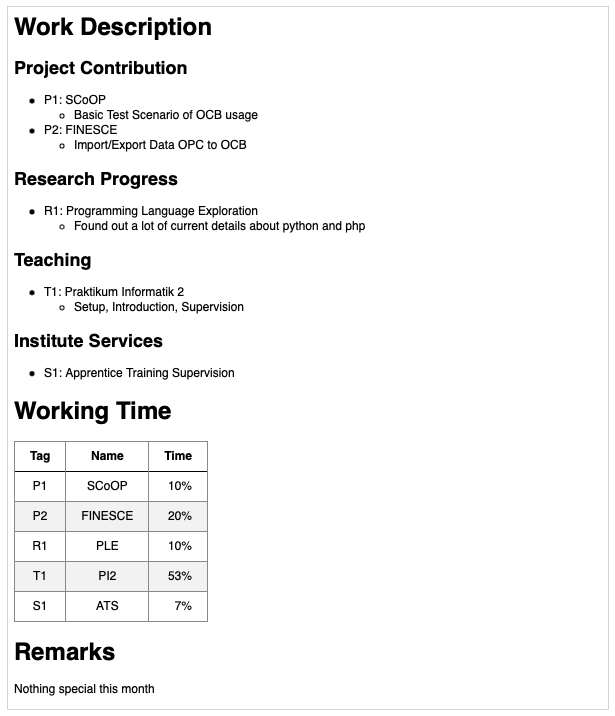
After uploading the file you will see it with the structure information beeing applied:
Your report consists of three major sections: Work Description, Working Time and Remarks. Work DescriptionThe section Work Description should contain a brief information about what you actually did and for what purpose. It consinst of four subsections: Project Contribution, Research Progress, Teaching and Institute Services. Project ContributionList the projects you are contributing to. Tag your projects with the letter Research ProgressList the research topics you did research about. Tag your topics with the letter TeachingList the names of lectures you have been contributing to. Tag them with the letter Institute ServicesThere are a lot of possible services you may have done for the institute that do not fit ito any of the other three categories. This is the place to list them. Tag them with the letter Working TimeThe Working Time section consists of a single table where you can refer to your labeled activities and indicate what percentage of your working time was consumed by that activity. You can use the Name column of the table as a mnemonic (easier way to remeber the meaning of the tag). RemarksThe Remarks section can be used for any kind of remark you may wish to add. However you should always indicate if there was a relevant amount of absense in the reported month. Is there a report template?If you haven't uploaded any report via Bettina Bot yet, you will find a link to a template file for your report on the upload page. Otherwise a link to download your previous report is offered. How do I send a report in advance?It may happen, that you are on a holiday during the time when the reports typically are collected, and thus are not able to hand in your report as a response to the email request in time. In this case you can upload your report in advance if you use the link from the email request in the previous month. You should see your previous report and below a link preceeded by upload a report for the next period in advance. Transition in Streamlining Personal and Project ReportsRecently the collection of information from personal reports into project reports has been automated. The goal of this automation is to reduce effort in reporting for our staff. Eventually the project reporting (except for the project lead) should be done completely with the personal report. In order to support the automated extraction of information and to accelerate the transition please comply to the following notes:
When you submit a personal report you will get direct feedback about what projects have been recognized for the automated reporting and what will be sent to the project lead. You find this information directly below your submitted report. If something is missing there, you can adapt and reupload your report until everything looks fine. Project ReportingWhat does the project reporting automation do?The project reporting tool scans the I am project lead and I don't receive request emails, why?In order to activate automation for a project, the project reporting repository has to contain a file What happens when projects end, will the email requests continue?Requests will continue until there are no new commits to the project reporting repository for 90 days. Our project has ended, how do I stop the email requests immediately?You can just remove the |